Recovering UEFI-based systems
If a source (backed up) server on the Plan the recovery page includes a partition labeled “ESP”, the system is UEFI-based. An ESP (EFI system partition) is required for a recovered UEFI system to boot into Windows.
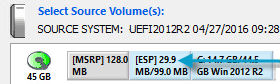
You can only recover a UEFI-based system to a UEFI recovery (destination) server. You cannot restore a UEFI-based system to a BIOS recovery server.
Restore the ESP partition from the source system to a GPT-formatted disk in the destination machine. If you drag a volume to an uninitialized disk on a UEFI system, the disk type automatically changes to GPT.
If an ESP volume already exists in the recovery server, the ESP partition from the protected machine should overwrite the existing ESP partition. You can also delete an existing ESP partition if, for example, it is too small to overwrite.
The order of partitions on the GPT disk should be: ESP, OEM (if any) and MSR followed by primary data partition(s). Partition order rules are enforced during a restore.
If required, an MSR (Microsoft Reserved) partition is automatically created on the destination machine during a UEFI system restore.